
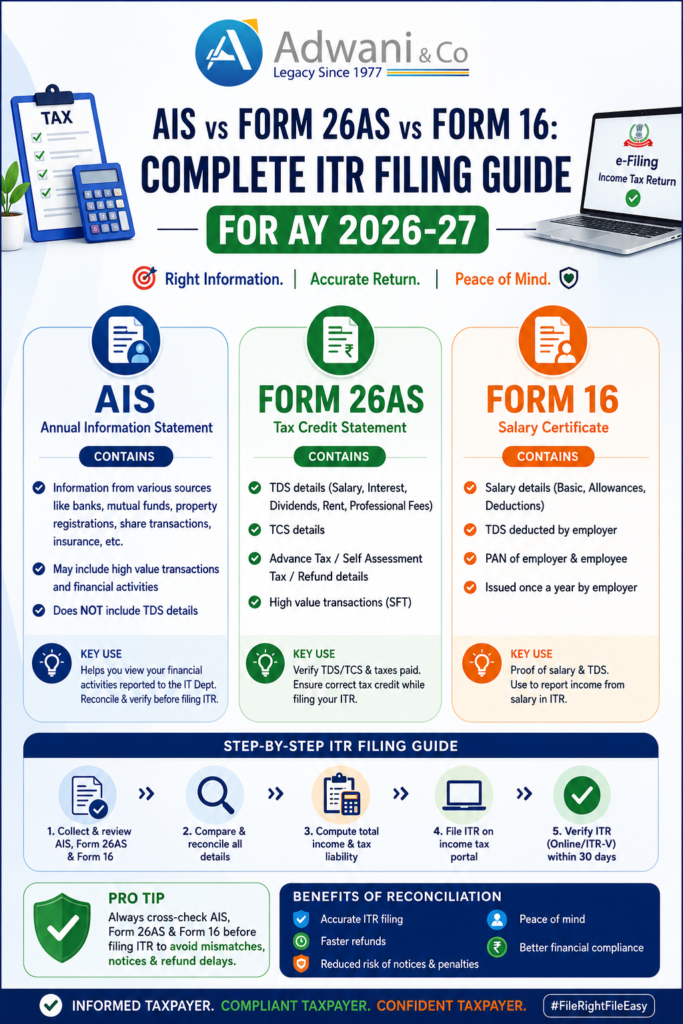
Every year, thousands of Indian taxpayers file their Income Tax Return (ITR) relying solely on Form 16 and every year, thousands receive a tax notice. The Income Tax Department already knows about your savings account interest, your mutual fund redemptions, your dividend income, and your property transactions. If your ITR does not match what the department already holds in its systems, you will get a notice. The good news? Fifteen minutes of reconciliation can save you months of compliance headaches. This guide walks you through exactly how to reconcile AIS vsForm 26AS vs Form 16 before filing your ITR for AY 2026-27.
Understanding the Three Key Documents for ITR Filing AY 2026-27
Before filing your Income Tax Return for AY 2026-27, it is essential to understand the purpose and scope of each document. Dr. Haresh Adwani, a Ph.D. holder in Commerce and law graduate with deep legal knowledge, consistently emphasises at Adwani and Company that most tax notices arise not from intentional concealment but from simple information mismatches between these three documents.
AIS vs Form 26AS vs Form 16: Full Comparison for ITR Filing
The table below illustrates why relying only on Form 16 while filing your ITR for AY 2026-27 is risky. AIS captures financial data across multiple sources banks, registrars, mutual fund houses, and foreign remittance portals all of which report directly to the Income Tax Department under Section 285BA of the Income Tax Act, 1961.
| Particulars | Form 16 | Form 26AS | AIS |
|---|---|---|---|
| Issued by | Employer | IT Department | IT Department |
| Salary details | ✔ Yes | Limited | ✔ Yes |
| TDS details | ✔ Yes | ✔ Yes | ✔ Yes |
| Bank interest income | ✗ No | Limited | ✔ Yes |
| FD interest | ✗ No | Limited | ✔ Yes |
| Dividend income | ✗ No | ✗ No | ✔ Yes |
| Share transactions | ✗ No | ✗ No | ✔ Yes |
| Mutual fund transactions | ✗ No | ✗ No | ✔ Yes |
| Property transactions | ✗ No | Limited | ✔ Yes |
| Foreign remittances | ✗ No | ✗ No | ✔ Yes |
| High value cash deposits | ✗ No | ✗ No | ✔ Yes |
| Credit card payments | ✗ No | ✗ No | ✔ Yes |
| Advance tax paid | ✗ No | ✔ Yes | ✔ Yes |
The AIS is accessible through the Income Tax e-filing portal at incometax.gov.in under the “Annual Information Statement” tab. The Income Tax Department introduced AIS to ensure comprehensive pre-filled information and reduce information asymmetry in ITR filing.
Why Form 16 Alone Is Not Enough for Accurate ITR Filing
This is the single most important lesson for every salaried taxpayer, according to Dr. Haresh Adwani of Adwani and Company. Form 16 covers only what your employer paid you and deducted as TDS. But your financial life is far broader and the Income Tax Department receives third-party reports from over 50 categories of reporting entities under the Statement of Financial Transactions (SFT) framework.
Practical example: what the IT department sees vs what Form 16 shows
Your Form 16 for FY 2025-26 shows:
- Salary income -₹12,00,000
- TDS deducted by employer -₹1,05,000
But your AIS for FY 2025-26 also shows:
- Savings bank interest – ₹18,500
- Fixed deposit interest – ₹72,000
- Dividend income (listed stocks) – ₹15,000
- Mutual fund redemption proceeds – ₹3,50,000
Total additional income visible to IT Dept: ₹1,05,500 + capital gains on ₹3,50,000 MF redemption
If this is not included in your ITR, the Income Tax Department’s automated systems will detect the mismatch and may issue a notice under Section 143(1) or Section 148A.
7 Point Pre-Filing Checklist: Reconcile AIS, Form 26AS & Form 16
Dr. Haresh Adwani recommends this structured checklist at Adwani and Company before any taxpayer hits the “Submit” button on their ITR for AY 2026-27. Each step addresses a common source of mismatch notices.
- 1. Match salary income across Form 16 and AISThe gross salary figure in Form 16 (Part B) should reconcile exactly with the salary reported in AIS. Discrepancies often arise from mid-year employer changes, arrear payments, or taxable perquisites. Check both carefully.
- 2. Verify all TDS credits in Form 26ASEvery TDS deducted by employer, bank, or any other deductor must reflect in Form 26AS under the correct PAN. If TDS is not reflecting, contact the deductor to file a correction before you file your ITR. Claiming TDS that is not in Form 26AS leads to demand notices.
- 3.Check savings and FD interest in AISAIS aggregates interest income from all banks and NBFCs linked to your PAN. Many taxpayers forget dormant accounts, joint accounts, or FDs opened in a relative’s name. Under Section 10(15), only small savings scheme interest qualifies for exemption the rest is fully taxable.
- 4.Review capital gain transactions from shares and mutual fundsAIS captures details of all listed security transactions and mutual fund redemptions reported by depositories (NSDL/CDSL) and mutual fund registrars (CAMS/KFintech). Compute short-term and long-term capital gains separately, applying the correct tax rates post the Finance Act 2024 amendments (LTCG at 12.5% above ₹1.25 lakh, STCG at 20%).
- 5.Verify dividend incomeSince FY 2020-21, dividend income from shares and mutual funds is taxable in the hands of the investor. AIS shows dividend data reported by companies and mutual funds. Ensure this is included under “Income from Other Sources” in your ITR.
- 6.Check high-value transactions in AISThe Income Tax Department receives mandatory SFT reports for: property purchases or sales above ₹30 lakh, cash deposits above ₹10 lakh in savings accounts, credit card payments above ₹1 lakh (cash) or ₹10 lakh (overall), and foreign remittances under the Liberalised Remittance Scheme (LRS). All such transactions appear in AIS and must be reconciled with your ITR.
- 7.Verify all tax payments: advance tax, self-assessment tax, TDS, and TCSForm 26AS is the authoritative tax credit statement. Before filing, confirm that all challan payments (advance tax under Section 209, self-assessment tax under Section 140A) are correctly reflecting. Any TCS collected on foreign remittances, luxury car purchases, or overseas travel should also be claimed appropriately.
For a detailed guide on tax payment reconciliation, learn more about our Tax Filing and Compliance services at Adwani and Company.
How to Access AIS and Form 26AS Before Filing ITR for AY 2026-27
Accessing AIS
Log in to the Income Tax e-filing portal at incometax.gov.in
→ Navigate to “Services”
→ “Annual Information Statement (AIS)”
→ Download the AIS PDF or JSON.
The Taxpayer Information Summary (TIS) within AIS provides a consolidated view suitable for ITR pre-filling. According to the Income Tax Department’s official guidelines, taxpayers should review and submit feedback if any information in the AIS is incorrect or duplicated before filing their return.
Accessing Form 26AS
Log in to the e-filing portal → “e-File” → “Income Tax Returns” → “View Form 26AS”. Alternatively, access it through your Net Banking portal (most Indian banks provide a direct link). The TRACES portal at tdscpc.gov.in also allows taxpayer login for Form 26AS downloads.
Accessing Form 16
Form 16 is issued by your employer on or before 15 June following the end of the financial year. If you have changed jobs during FY 2025-26, ensure you have Form 16 from both employers the combined salary must be disclosed in your ITR.
Professional tip from Dr. Haresh Adwani, Adwani and Company
Form 16 tells you what your employer reported salary, TDS, and allowances for the year.
Form 26AS tells you what taxes have been deposited against your PAN the authoritative credit statement.
AISTells you what the Income Tax Department already knows about all your financial activity. File accordingly.
Common Reasons for Income Tax Notices Related to ITR AY 2026-27
The Ministry of Finance and the Central Board of Direct Taxes (CBDT) have progressively enhanced third-party data integration with the ITR filing system. The pre-filled ITR form now draws data directly from AIS. As a result, mismatches are flagged automatically without any manual scrutiny. Common triggers include:
- →Interest income omittedFD and savings interest not reported under “Income from Other Sources”.
- →Capital gains from mutual funds or shares not reportedEven if the gain is below the exemption threshold, the transaction must be disclosed.
- →Dividend income not includedDividends received from stocks or mutual fund schemes since FY 2020-21 are fully taxable and must be reported.
- →TDS claimed exceeds Form 26AS creditIf the deductor has not deposited TDS, you cannot claim it. This creates a demand after processing.
- →High-value transactions without matching incomeA large property purchase or high credit card spend with no corresponding income explanation can trigger scrutiny.
Key takeaway from Adwani and Company:
The most common cause of post-filing notices is not deliberate tax evasion. It is a mismatch between the information in your ITR and information already available with the Income Tax Department. Reconciling Form 16 + Form 26AS + AIS before filing eliminates this risk almost entirely.
The 15-Minute Reconciliation Formula Before Filing ITR
According to Dr. Haresh Adwani, even a basic 15-minute reconciliation exercise can prevent the majority of AY 2026-27 ITR notices for salaried individuals.
Step 1 -Download AIS from incometax.gov.in and review all entries. Submit feedback for any incorrect entries.
Step 2 – Download Form 26AS and confirm all TDS credits, advance tax payments, and self-assessment tax challans are correctly reflected.
Step 3 – Cross check salary in Form 16 (Part B) with AIS salary data.
Step 4 -Note all additional income sources visible in AIS (interest, dividend, capital gains, rental income, foreign remittances) and ensure each is captured in your ITR.
Step 5 – File only after all three documents are reconciled. If discrepancies exist that you cannot resolve, seek professional guidance before submission.
Learn more about our ITR filing and reconciliation services at Adwani and Company – trusted by hundreds of salaried professionals and businesses across India.
Frequently Asked Questions
1.What is the difference between AIS and Form 26AS for ITR filing?
Form 26AS is a tax credit statement that shows TDS deducted, TCS collected, and direct taxes paid against your PAN. AIS (Annual Information Statement) is a far more comprehensive document that shows all financial transactions reported to the Income Tax Department including interest, dividends, capital gains, property transactions, and foreign remittances. AIS subsumes and expands beyond Form 26AS for the purpose of ITR filing.
2.Is AIS mandatory to check before filing ITR for AY 2026-27?
While the Income Tax Act does not legally mandate reviewing AIS before filing, the Income Tax Department strongly recommends it. Since the ITR pre-fill now draws from AIS data, any discrepancy between your filed return and AIS can trigger automated notices under Section 143(1). Reviewing AIS before filing is considered best practice by all tax professionals, including Dr. Haresh Adwani at Adwani and Company.
3.What should I do if the information in AIS is incorrect?
You can submit online feedback directly on the AIS portal at incometax.gov.in. Options include marking information as “Information is correct”, “Information is not fully correct”, “Information relates to another PAN/Year”, or “Information is duplicate”. Submitting accurate feedback before filing helps avoid notices and ensures the Taxpayer Information Summary (TIS) reflects the correct data for pre-filling.
4.What happens if there is a mismatch between Form 16 and AIS?
A mismatch between Form 16 and AIS is usually because Form 16 only reflects employer-reported data, while AIS aggregates data from multiple sources. Always reconcile both before filing. If the mismatch is due to an employer’s error in Form 16, contact your employer’s payroll or HR department to issue a corrected Form 16. If the mismatch is due to incorrect AIS data, submit feedback on the AIS portal.
5.Can I file ITR without Form 16 if I have AIS and Form 26AS?
Yes, Form 16 is not a mandatory document for filing ITR. However, it simplifies the process for salaried taxpayers. If you do not have Form 16, you can use your salary slips, Form 26AS, and AIS to reconstruct income and TDS data for accurate ITR filing. Consulting a CA like Dr. Haresh Adwani at Adwani and Company is advisable if you are filing without Form 16.
6.What is the due date for ITR filing for AY 2026-27?
For individuals not subject to audit, the due date for filing ITR for Assessment Year 2026-27 (Financial Year 2025-26) is 31 July 2026. For taxpayers subject to audit, the due date is typically 31 October 2026. Always check the Income Tax Department’s official portal for any notifications regarding due date extensions.
7.Which ITR form should salaried individuals use for AY 2026-27?
Most salaried individuals with income from salary, one house property, and other sources (interest, dividends) file ITR-1 (Sahaj). If you have capital gains from shares or mutual funds, you must file ITR-2. If you have business income, ITR-3 or ITR-4 may apply. Read our detailed guide on choosing the correct ITR form for AY 2026-27.
Conclusion: File a Clean ITR for AY 2026-27 with Full Reconciliation
The Income Tax Department has made a significant shift over the past few years: it now receives comprehensive financial information about taxpayers from dozens of reporting entities before a single return is filed. AIS is the public-facing reflection of this data. Form 26AS validates your tax payments. Form 16 is your employer’s certificate. Together, they form the complete picture of your tax obligation for FY 2025-26.
Filing an ITR that does not align with AIS is not just risky it is increasingly avoidable, given the pre-fill functionality now available on the portal. As Dr. Haresh Adwani of Adwani and Company consistently advises: spend fifteen minutes reconciling all three documents, address any discrepancies proactively, and file a return that matches the department’s own records. That is the single most effective way to ensure a clean, notice-free ITR for AY 2026-27.
Author
PhD Commerce | Law Graduate
Founder and Senior Partner, Adwani and Company. Over 40 years of expertise in income tax, corporate law, GST, and financial advisory.
Legal Disclaimer: This article is published for informational and educational purposes only. Nothing contained herein constitutes legal, financial, or tax advice, nor should it be treated as a substitute for professional consultation tailored to your specific circumstances. Tax laws, rates, and provisions are subject to change; readers are strongly advised to consult a qualified Chartered Accountant or tax advisor before acting on any information in this article.
All content is original. References to government portals and statutory provisions are paraphrased for educational purposes in compliance with fair use principles. No content has been reproduced from third-party sources